


Post Office Services
1.0.0

To get access, create an account or sign in.
The Find a Post Office API returns a list of post offices near a given location. Each post office will indicate if you can deliver a package directly to that post office and its hours.
Within Find a Post Office is the Deliver to Post Office option. With this option, you can use Find a Post Office during checkout to give your online shoppers the ability to have purchases delivered directly to a participating post office of their choice near their home, office, or anywhere they choose.
Please note: Deliver to Post Office is only available with Xpresspost™ and Expedited Parcel™ services.
Find a Post Office
The customer provides a location (a postal code, address, or intersection) and the API returns a list of nearby post offices in that area. This response also indicates if each location offers delivery directly to the post office for added flexibility. Once a specific post office is chosen by the customer, the API retrieves detailed information about that particular post office.
To successfully offer the Deliver to Post Office option:
April 30, 2026
We've updated our APIs to improve security and performance. Protocols are now REST-only with JSON standardization (XML and SOAP are no longer supported), and OAuth 2.0 Bearer tokens are now mandatory for all requests. We've also added YAML configuration files and expanded support for 10 programming languages.
For full details, read the release notes.
Find a Post Office can be called in any order but is generally called through the following two calls:
| Service | Description |
|---|---|
| Get Nearest Post Office | Returns a list of post offices near a given location. It also specifies which ones support direct delivery to the post office rather than to a recipient’s address. |
| Get Post Office Detail | Provides details of post offices returned in the Get Nearest Post Office call (for example, hours of operation). |
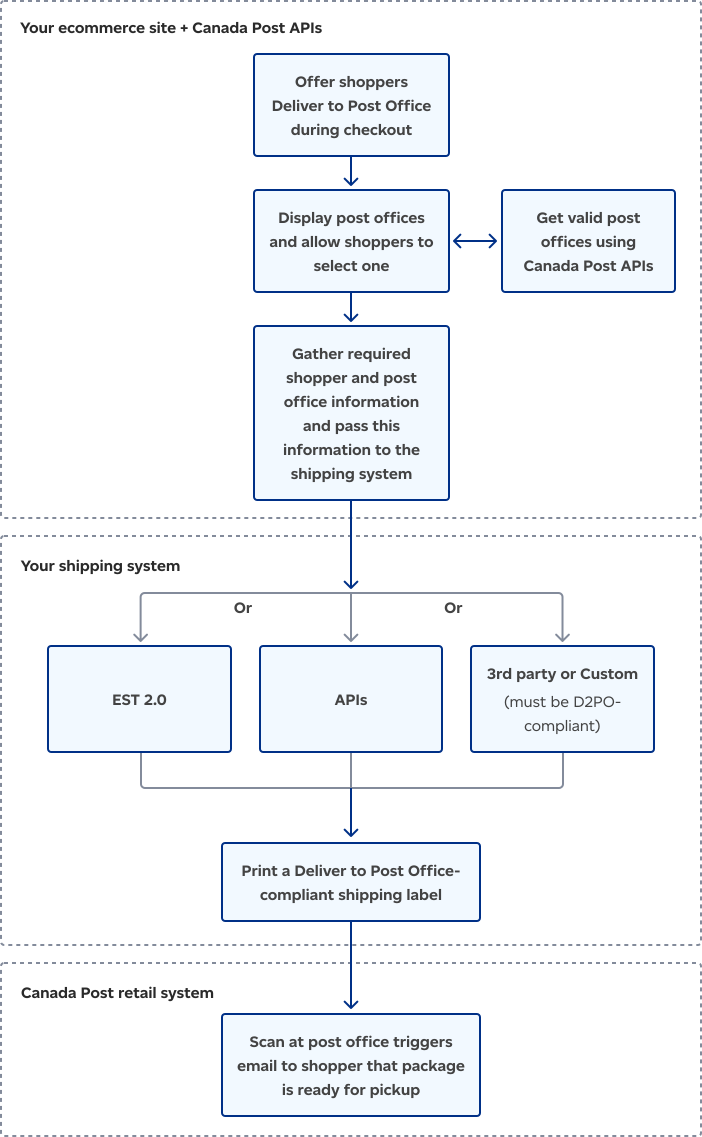
The Deliver to Post Office workflow is divided into three key stages. First, customers select a post office on an ecommerce site using Canada Post data, and the shipping information is sent to the retailer's shipping system. Second, a compliant shipping label is generated. Finally, the label is scanned at the post office, and the customer is notified that their package is ready for pickup.
| Your process | Programming summary |
|---|---|
| Present shoppers with a map showing post offices near their ship-to address or let shoppers enter a postal code, address, or intersection near the pickup location | To find post offices that support Deliver to Post Office, send a request to the nearest post office and set the D2PO element to true. The response will only include post offices that have the Deliver to Post Office feature. |
| During checkout, shopper selects a post office for package delivery | Along with the details of the order, you also save the following information:
|
| The following steps describe how to produce shipping labels using web services | When using Create Shipment to set up the order, you must include:
When you print the address label:
|
| When the post office scans the barcode, the shopper gets an email | None. |
| At the post office, the shopper shows their government-issued photo ID. The ID must have the address used to purchase the item. | The following elements appear in the response to Get Shipment Details: Destination: Contains the address of the post office where the shipment will be delivered. Recipient: Contains the mail recipient’s address that you added in the Destination element. |

Consult our Developer guide for details about access tokens, authentication, rate limits, and more.

Get answers to common questions in our FAQs. If you can’t find your answers there, connect with our team.