


Returns
2.0.0

To get access, create an account or sign in.
The Returns API allows you to create shipping labels for authorized and open returns. Both options generate "bill on scan" return labels that are not associated with a manifest. Also, they don’t need to be linked to an outgoing label.
There are 3 types of returns:
April 30, 2026
We've updated our APIs to improve security and performance. Protocols are now REST-only with JSON standardization (XML and SOAP are no longer supported), and OAuth 2.0 Bearer tokens are now mandatory for all requests. We've also added YAML configuration files and expanded support for 10 programming languages.
For full details, read the release notes.

The Authorized Returns workflow begins with the API retrieving shipping information that was gathered from a client app. The API then initiates a Create Authorized Return call and then a Get Artifact call. The final step involves printing the return shipping label, completing the workflow.
Returns service functionality is provided through the following calls:
| Service | Description |
|---|---|
| Create Authorized Return | Creates a return shipping label with sender and receiver address details. This label is emailed to the person returning the item through a self-serve or service agent process. |
| Get Artifact | Retrieves the PDF or ZPL II data for the authorized return label. |
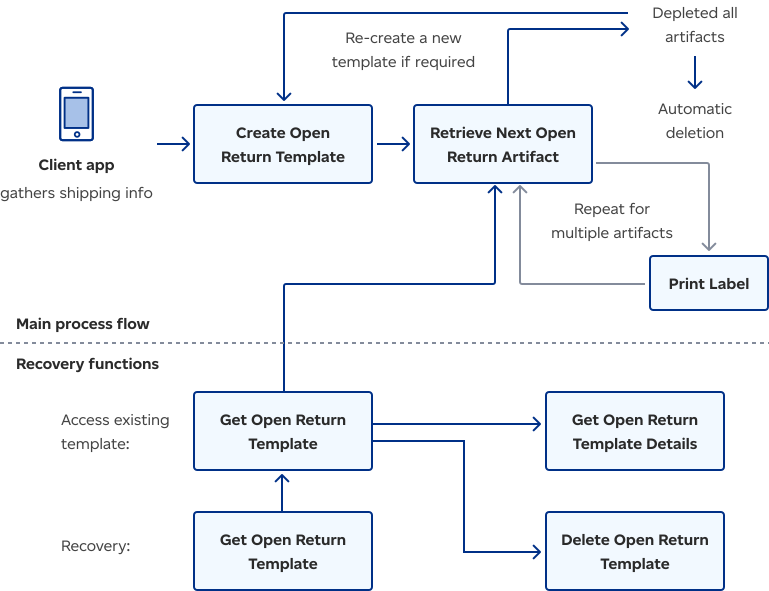
There are two main pathways in this flowchart: the Main Process Flow for creating and using Open Returns templates and Recovery Functions for accessing or modifying existing Open Returns templates. The main process involves creating a template, generating labels for multiple artifacts, and then deleting the template when finished. Recovery functions allow users to retrieve, modify, or delete existing templates before re-entering the main process flow.
Rating service functionality is provided through the following calls:
| Service | Description |
|---|---|
| Create Open Return Template | Creates generic labels for retrieval and printing. The sender address and package weight are unknown. Each label has a unique barcode, but the rest of the data is the same. The labels can be distributed as part of the original shipment or sent to a specific individual. Please note:
|
| Retrieve Next Open Return Artifact | Retrieves the PDF or ZPL II data for a Return Label Artifact that was pre-established using Create Open Return Template. |
| Get Open Return Template | Retrieves the information that allows access to the Retrieve Next Open Return Artifact service associated with the template. Please note: This service returns an identical response to the Create Open Return Template call that created the template. |
| Get Open Return Template Details | Retrieves the original information provided when Create Open Return Template was called. This includes the number of labels specified for this template, the receiver, and more. This call also provides the number of remaining labels for this template. |
| Delete Open Return Template | Deletes an existing active Open Return Template. |
| Get Open Return Templates | Gets the list of active open return templates based on the mailed-on-behalf-of customer number. Active open return templates still have open return artifacts available for retrieval. Once all the artifacts from a template are collected, the open return template is depleted and deleted. |

Consult our Developer guide for details about access tokens, authentication, rate limits, and more.

Get answers to common questions in our FAQs. If you can’t find your answers there, connect with our team.