


Shipping
8.0.0

To get access, create an account or sign in.
The Canada Post Shipping API helps customers ensure accurate and timely delivery of their orders.
With this API, customers can:
New to Canada Post?
Read our backgrounder on shipping, manifests, and mailing on behalf of customers
The Canada Post Shipping API consists of both a shipping API and – where shipping labels state “manifest required” – a secondary manifest service.
April 30, 2026
We've updated our APIs to improve security and performance. Protocols are now REST-only with JSON standardization (XML and SOAP are no longer supported), and OAuth 2.0 Bearer tokens are now mandatory for all requests. We've also added YAML configuration files and expanded support for 10 programming languages.
For full details, read the release notes.
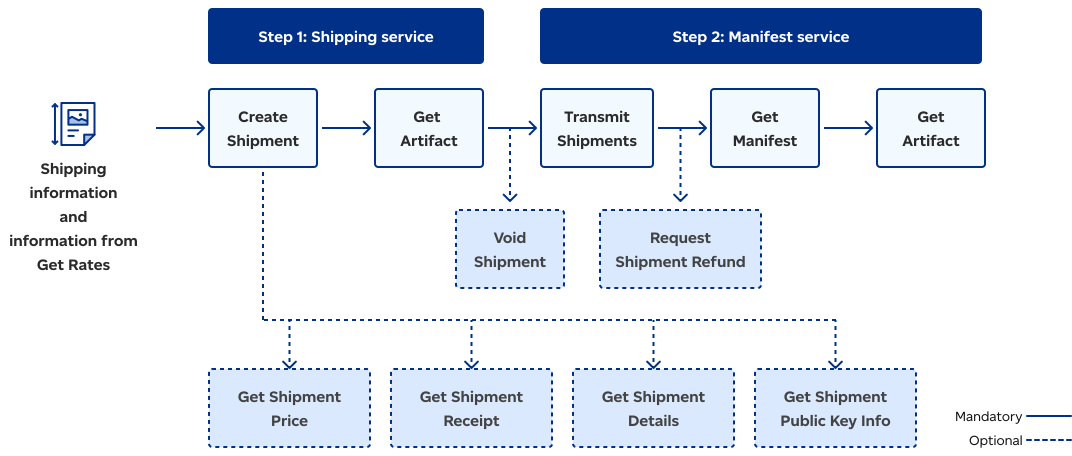
The Shipping workflow begins with the API retrieving shipping information that was gathered from a client app and information gathered from the Get Rates call. The API then divides the process into two main steps: Shipping service and Manifest service. Shipping service involves creating a shipment – with optional calls of Get Shipment Price, Get Shipment Receipt, Get Shipment Details, and Get Shipment Public Key Info – followed by Get Artifact (Void Shipment is an optional call following Get Artifact). Manifest service involves Transmit Shipment (Request Shipment Refund is an optional call following Transmit Shipment). The Get Manifest call follows and, finally, Get Artifact is called.
Once integrated into your platform or application, the Canada Post Shipping API enables the creation of shipments and labels as well as void shipment and refund requests.
Shipping service functionality is provided through the following calls:
| Service | Description |
|---|---|
| Create Shipment | Creates a new shipment, including the shipping label image, links, and shipment details. |
| Get Shipment | Retrieves the links created by a previous Create Shipment call. |
| Get Shipment Price | Retrieves pricing details for a shipment created in a previous Create Shipment call. |
| Get Shipment Details | Retrieves shipment details for a shipment created by a prior Create Shipment call. |
| Get Shipment Public Key Info | Used to retrieve the details on the public key including expiry date, QR code, and public URL (un-authenticated URL). |
| Get Groups | Retrieves all group IDs associated with a customer (or mailed-on-behalf-of customer) for shipments that have been created. |
| Get Shipments | Retrieves all shipments associated with a specific group or manifest. |
| Get Shipment Receipt | Retrieves payment information for a single shipment that was paid by credit card and didn’t require a manifest. The data returned can be formatted to print a credit card receipt. |
| Get Artifact | Used to retrieve the rendered label(s) for a shipment created by a prior Create Shipment call. It can be called more than once to reprint a spoiled label. Important! Once you’ve printed the shipping label, if your shipping labels state “manifest required”, you must create a manifest and provide a hard copy to Canada Post with your shipment (see Step 2: Manifest service). Read more |
| Void Shipment | Indicates that a printed label for a manifested shipment was spoiled or cancelled by the customer and that it shouldn’t be transmitted and billed. |
| Request Shipment Refund | Sends a request to refund a transmitted shipment for which a label has been printed but subsequently spoiled. |
If your shipment contains multiple packages and your shipping labels state “manifest required”, you must complete the second step in the process and create a shipping manifest with the manifest web service.
A shipping manifest details the contents of a shipment, including the type and quantity of items, destination address, shipment date, value, item weight, and dimensions, as well as any special handling instructions or requirements.
The manifest is used to record and track shipment contents in case of loss or damage. A manifest is also used to ensure compliance with any regional regulations as well as any required special handling of hazardous materials or perishable goods.
You need to provide a shipping manifest when your shipments are dropped off at – or picked up by – your Canada Post carrier. It will detail your shipment contents, verify the number of packages in your shipment, and provide proof of payment.
Learn more in our manifest backgrounder
Note on unpaid shipments
Canada Post monitors all shipments to make sure they're properly manifested. To avoid processing fees, please make sure all shipments are manifested electronically prior to pick-up or drop-off.
If shipments are processed without a manifest:
Important: Once an automated manifest is created, your original Group IDs can no longer be transmitted. Attempting to do so will trigger the following error:
9118 - Group id {0} was not found for transmission. Please remove or correct.
How to retrieve your manifest
An automated manifest will be emailed to the address associated with your account. Developers can also retrieve these records by sending a request to Get Manifest using the provided Manifest ID.
Manifest service functionality is provided through the following calls:
| Service | Description |
|---|---|
| Transmit Shipments | Uploads shipment data to billing and tracking systems and returns the information required to invoke the Get Manifest and Get Artifact services. The transmit shipment call triggers the billing process and specifies shipments to be included in the manifest. Important! Canada Post bills for all manifests submitted through Transmit Shipment calls made in the production environment. Therefore, make sure testing is done in the development environment. Read more |
| Get Manifest | Confirms that a manifest has been created and retrieves the manifest details. Please note: If this call invokes a 9153 error, pause briefly then continue to call Get Manifest until you get a successful response. If the call invokes a 9154 error, the Transmit Shipment call has failed, and you must perform a Transmit Shipment call again. |
| Get Artifact | Retrieves the rendered manifest. It allows you to print your manifest to provide with your shipment pickup or drop-off. Invoke this call as often as required to reprint a given manifest. Reminder: Provide a printed copy of the manifest with each shipment you deposit and pick up. |
| Get Manifest Details | Retrieves all cost details associated with a given manifest. |
| Get Manifests | Retrieves a list of previously transmitted manifests within a given date range. |

Consult our Developer guide for details about access tokens, authentication, rate limits, and more.

Get answers to common questions in our FAQs. If you can’t find your answers there, connect with our team.