


Pickup
1.0.0

To get access, create an account or sign in.
Integrate our One-Time On-Demand Pickup API and request a package pickup right from your online platform. You can request a One-Time On-Demand pickup at your business location. If your contract specifies a third-party pickup, you can also request a pickup at that location.
Follow these steps to request a pickup:
See the full list of request elements in the Create Pickup Request web service.
Once you’ve submitted a successful pickup request, you’ll receive a request ID number and status (pending). If you request a same-day pickup after the cut-off times for that day, you’ll receive an error.
April 30, 2026
We've updated our APIs to improve security and performance. Protocols are now REST-only with JSON standardization (XML and SOAP are no longer supported), and OAuth 2.0 Bearer tokens are now mandatory for all requests. We've also added YAML configuration files and expanded support for 10 programming languages.
For full details, read the release notes.
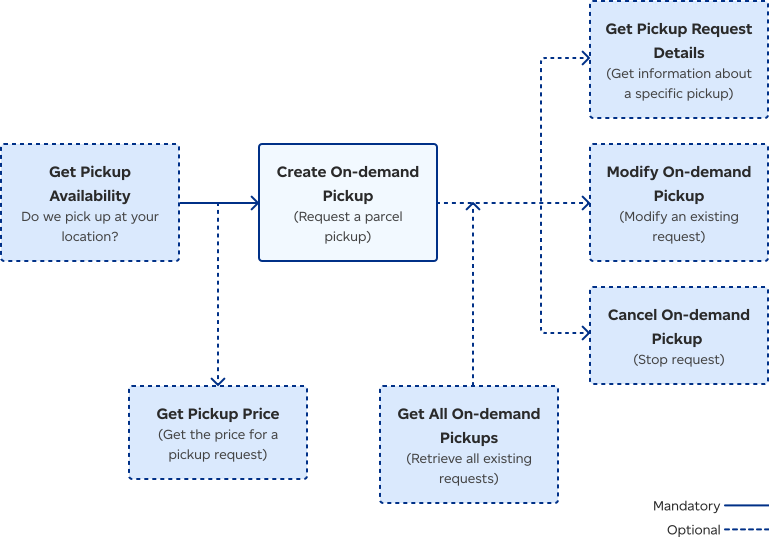
The Pickup workflow begins by optionally checking for Canada Post pickup availability and pricing at a specific location. Once confirmed, a pickup request can be created. After creation, the system can optionally retrieve all pickup requests, get details about a specific request, modify an existing request, or cancel a scheduled pickup.
Pickup service functionality is provided through the following calls:
| Service | Description |
|---|---|
| Get Pickup Availability | Retrieves pickup availability and cut-off times based on pickup location (postal code entered). |
| Get Pickup Price | Returns price for a pickup request. |
| Create On-demand Pickup | Creates a request for a One-Time On-Demand pickup and returns pickup request ID and links (URLs included in the API response). |
| Get Pickup Details | Uses the request ID returned from the Create Pickup request and returns an information summary about a specific pickup. |
Modifies the details of an existing pickup request, such as contact details or pickup time. Please note: If you need to change your pickup location or your payment information, cancel your pickup request and create a new one. | |
| Cancel Pickup Request | Cancels an existing pickup request. Please note: If you cancel a request at your default business address, you won’t be able to recreate another request in that same timeslot. Use Update Pickup Request or request a different time. |
| Get All On-demand Pickups | Retrieves all open pickup requests and the status of each. |

Consult our Developer guide for details about access tokens, authentication, rate limits, and more.

Get answers to common questions in our FAQs. If you can’t find your answers there, connect with our team.