

API fundamentals
Fundamentals for integrating and interacting with Canada Post APIs
Canada Post APIs allow ecommerce solution providers and online merchants to integrate services such as shipping, rating, and tracking data into a platform or website. Once integrated, your application will access Canada Post servers over REST style architecture.
Before beginning integration work
- Read Getting started to find out how to sign up and get your API keys.
- Review the information included here in API fundamentals for essential information common to all APIs.
- Use the “Try the API” feature with your [Test] app to verify access and view sample data. Please note: Successful requests via [Test] apps return static, stubbed responses.
- Read the detailed functional and technical descriptions for each of our APIs in the API catalog.
Using REST to interact with our APIs
The following image shows the general format for any REST request. Consult the service directory for details by call.
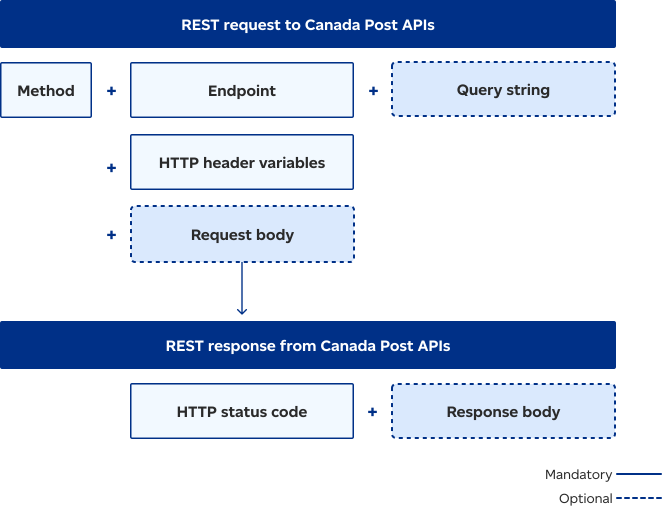
A REST request to a Canada Post API involves specifying the HTTP method, URL endpoint, optional query parameters, and HTTP headers. The request payload is sent to the API. The API responds with an HTTP status code and the requested information or error details.
Endpoints
You’ll use two types of endpoints to access Canada Post APIs:
- Endpoints constructed by your application code
- Endpoints provided in responses to prior requests
Each endpoint has been given a handy name for reference purposes. This reference name doesn’t appear directly in the endpoint.
Become familiar with the reference names. When they need to be invoked by application code, consult the documentation in the API catalog for details about each endpoint or code sample.
Constructed endpoints
Endpoint example (as per documentation) for Get Manifests
Constructed endpoints consist of a fixed URL part and may also contain variable parts. The endpoint for Get Manifests follows:
XX/{mailed by customer}/{mobo}/manifest?from=YYYYMMDD&to=YYYYMMDD
Replace {mailed by customer} with your customer number.
Replace {mobo} with the MOBO (mailed on behalf of) customer number or repeat your customer number.
Replace YYYYMMDD with the start and end dates.
Endpoint example
Below is a sample GET call with variable values populated.
https://api.canadapost-postescanada.ca/prod/devportal-portaildesdeveloppeurs/shipping/v1/123456789/123456789/manifests?from=20100324&to=20100405Constructed endpoint variables
There are 2 types of variable parts:
- The "domain" of the request. For example:
- The mailed by customer number
- The MOBO customer number associated with the request
- The query string of the request:
- Contains one or more query parameters that may be required depending on the API being invoked.
Domain variables: mailed by customer and MOBO
The domain might be fixed for all calls if your application acts on behalf of one customer only. In the detailed service documentation, domain variables are represented inside curly brackets. For example:
{mailed by customer} means your application must provide your customer number.
{mobo} means your application must provide the customer number of the entity you’re mailing on behalf of
(referred to as a MOBO customer). If you’re not mailing on behalf of anyone, repeat your customer number here.
The domain variables are protected in the same way as the request and response body under the HTTPS connection.
Query string
If present, the query string will vary based on your current application needs. For example, the query string
could pass user input of postal-code to the Get Nearest Post Office request.
To be interpreted properly, a query string can’t contain blank spaces. Blank spaces can, however, be replaced by %20 (for example, for the space between the two parts of a postal code).
The query string is protected in the same way as the request and response body under the HTTPS connection.
Provided endpoints
Canada Post APIs provide dynamically generated endpoints as a response from a previously called web service. In these cases, you should use the endpoint as received and shouldn’t attempt to parse or construct it.
All Canada Post APIs invoked by provided endpoints require an HTTP GET method, and don’t need a request body.
Link attributes of provided endpoints
| Link attribute | Meaning |
|---|---|
| rel (relationship to link) | Indicates the resource related to the current response. |
| href (hypertext reference) | Indicates the endpoint to be used to call the API. It contains the URL and may also contain a query string. |
| media-type | A character string that indicates the format and version of the data to expect when the API is invoked. The value in this attribute should be copied to the HTTP header variable "Accept" when the href link is invoked. |
| index (optional) | Present on links to formatted output such as labels. The value starts at 0 for the first page and subsequent pages (if any) count up by 1. |
Call patterns
The first interaction with a Canada Post API will always be through a constructed endpoint. Subsequent interactions will typically invoke provided endpoints until all information related to the original call has been retrieved. Two common patterns can be used. Refer to Ad hoc and batch call patterns.
If at any time during processing your application fails and stored links are lost, they can be recovered with synchronization calls.
HTTP header variables
Mandatory HTTP header variables must be provided for each request. Foremost is the authorization value which is used to authenticate each request.
| HTTP header variable | Value (Mandatory or Optional) | Description |
|---|---|---|
Authorization GET POST DEL | Bearer (Mandatory) |
|
Content-Type POST | Unique per service group. Refer to API documentation for details (Mandatory) | This is the JSON version of the body you are sending in the POST. (Please note: */* in place of the header value will return an error.) |
Accept GET | Unique per service group. Refer to API documentation for details or use "media-type" from the provided link (Mandatory) | This is the JSON version of the response you are expecting to receive. (Please note: */* in place of the header value will return an error.) |
Accept-Language GET POST | "fr-CA" or "en-CA" (Optional) | This indicates the preferred language of the human readable error message (if an error is generated). |
If-None-Match GET | Optional (Optional) | May be included in the request if a prior GET was cached. Either "304 – not changed" or the new version of the resource will be returned. |
Structure of the HTTP response
The general form of an HTTP response to Canada Post APIs contains the following standard headers:
Status Code: 200 OK
Date: Wed 06 Jul 202317:21:53 GMT
Content-Type: application/json
Etag: "6"
{body}
Error message structure
The error message structure (if returned) takes the place of the normal success structure.
Sample JSON response to an error condition
HTTP/1.1 403 Content-type:application/vnd.cpc.shipment+json
"messages": [
      {
        "code": "7007",

        "description": "The weight value is invalid. The weight of each piece must be less than or equal to 30 kg."
      },
      {
        "code": "1722",

        "description": "The options are invalid for the selected Service. Please change the options or select another service."
      }
 ]
Versioning
For versioning, please refer to our Release notes.
Using OpenAPI files
All API requests and responses are validated against a corresponding OpenAPI. The OpenAPI definition files are useful to generate code or to validate JSON requests on the client side in advance of making a call. The OpenAPI files were used to generate the code samples. To download OpenAPI files, go to the respective API documentation and select the Download OpenAPI document link.