

Track parcels
Provide real-time status updates and visibility for every shipment
Required API products

Getting started
Before integrating our shipping APIs, make sure you complete the following prerequisites and setup steps. For a more detailed overview, refer to the QuickStart guide.
Prerequisites
Please note: To use our APIs, you must first have a valid Canada Post business account, which provides a customer number. Commercial customers typically have a formal commercial contract, which also provides a contract number and is billed to a credit account. Solutions for Small Business™ customers can access the API using their small business account number. Returns services are generally billed to the credit card on file in your profile or business account.
Once you have an account, here are the next steps to use the API:
- Create a canadapost.ca user ID.
- Join the Canada Post Developer Portal.
- Get your production and test API credentials (API Key and API Secret).
API endpoints
Production environment
https://api.canadapost-postescanada.ca/prod/devportal-portaildesdeveloppeurs /tracking/v1/pins/{pinNumber}/summariesRequired headers
| Header name | Required status | Description/Purpose |
|---|---|---|
| Content-Type | Mandatory Example value/Format Unique per service group. Refer to API documentation for details. | This is the JSON version of the body you’re sending in the POST. Please note: */* in place of the header value will return an error. |
| Accept | Mandatory Example value/Format Unique per service group. Refer to API documentation for details or use "media-type" from the provided link returned in the response. | This is the JSON version of the response you’re expecting to receive. Please note: */* in place of the header value will return an error. |
| Authorization | Mandatory Example value/Format Bearer | Carries the access token to authenticate the request. Details:
|
| Accept-Language | Optional Example value/Format "en-CA" or "fr-CA" | This indicates the preferred language for any human-readable error messages that may be generated. |
Available tracking services
We offer both domestic and international tracking services. Below is a categorized list of commonly supported services, including the service codes required for all API requests.
Domestic services
(within Canada)
| Service name | API service code | Benefits |
|---|---|---|
| Regular Parcel™ | DOM.RP | Cost-effective ground shipping. |
| Expedited Parcel™ | DOM.EP | Faster delivery with tracking. |
| Xpresspost™ | DOM.XP | Guaranteed next-day or 2-day delivery in major urban centres. |
| Priority™ | DOM.PC | Fastest delivery option with tracking and signature. |
| Library Materials | DOM.LIB | Special, economical service for shipping library materials (books, and so on). |
Services to the U.S.
(shipping to the United States)
| Service name | API service code | Benefits |
|---|---|---|
| Expedited Parcel™ – USA | USA.EP | Delivery in as little as 4 business days for larger parcels. Tracking included. |
| Xpresspost™ – USA | USA.XP | Delivery in 2 to 3 business days. Guaranteed service with tracking. |
| Tracked Packet™ – USA | USA.TP | Cost-effective option for small and lightweight items. Includes tracking. |
International services
| Service name | API service code | Benefits |
|---|---|---|
| Xpresspost™ – International | INT.XP | Guaranteed, fast delivery in as little as 4 business days to major markets. Includes tracking. |
| Tracked Packet™ – International | INT.TP | Cost-effective option for small and lightweight items to select countries. Includes tracking. |
| International Parcel – Air | INT.IP.AIR | Standard air service for larger parcels. Includes tracking for many destinations. Tracking information available only for events within Canada. |
| International Parcel – Surface | INT.IP.SURF | Standard ground/sea service for larger parcels. Long transit times (1 to 3 months). Tracking information available only for events within Canada. |
Sample requests
Search by Tracking ID details
GET https://api-stg.canadapost-postescanada.ca/prod/devportal-portaildesdeveloppeurs/tracking/v1/pins/{PIN}/detailsSearch by Delivery Notice Card details
GET https://api-stg.canadapost-postescanada.ca/prod/devportal-portaildesdeveloppeurs/tracking/v1/dncs/{DNC}/detailsSearch by Reference Number details
GET https://api.canadapost-postescanada.ca/prod/devportal-portaildesdeveloppeurs/tracking/v1/refs/summaries?customer-number={customerNumber}&reference-number=ABC123456789&destination-postal-code=M9W1J1&mailing-date-from=2026-02-25&mailing-date-to=2026-02-26Use cases
The following are typical scenarios that customers might encounter when integrating with our Tracking API. Each use case is further illustrated using a call diagram, giving further clarity on the flow of data or requests and the parameters needed to make these calls.
Tracking and customer pickup
- Use the Get Tracking Summary and Get Tracking Details calls to allow customers to track orders from your store.
- Use the Get Delivery Confirmation Certificate call to allow customer service staff to view delivery confirmation certificates.
Example 1
Track orders from your website
Calls to Get Tracking Summary and Get Tracking Details allow customers to track their orders directly from your website.
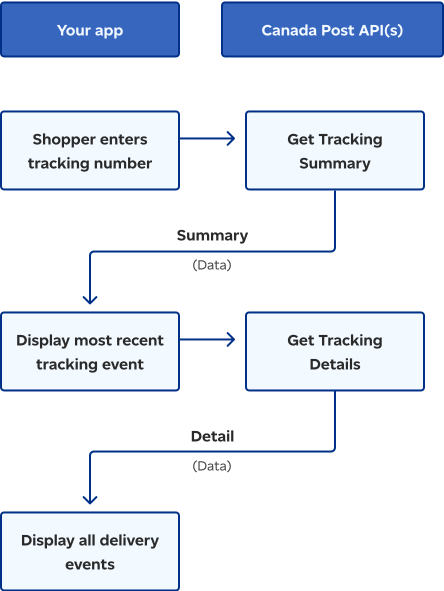
The flowchart illustrates the typical flow of interactions between a customer application and the Canada Post API for tracking packages. The customer application sends a tracking number to the API which returns this data to the application, displays the most recent tracking event, and all subsequent delivery details.
Example 2
View delivery confirmation certificate
Your customer service staff can get the same tracking information as described in the Track orders from your website process. They can also view the delivery confirmation certificate.
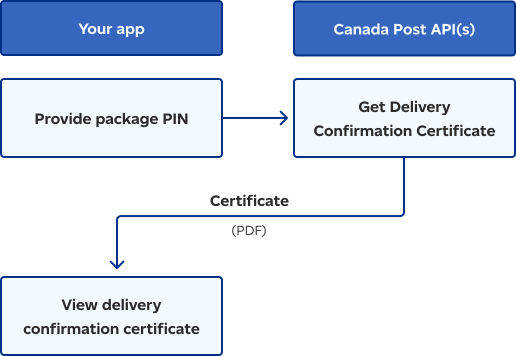
This flowchart illustrates the method for confirming package delivery using a delivery confirmation certificate. The app obtains a package PIN, requests the delivery confirmation certificate from the Canada Post API, and then retrieves and displays the PDF certificate as proof of delivery.
Testing and troubleshooting
Developers must decide when to expose an error message directly to the end-user versus implementing a mitigation strategy to prevent the error.
Common errors and how to fix them
Before troubleshooting, review our list of common errors and their codes. Each entry includes the specific HTTP status code and the recommended mitigation action.
Example: A 9112 error ("Service not available") may indicate a configuration problem. The mitigation is to check the available services for the selected origin or destination.
API error response structure
API error responses typically return a 400 Bad Request (for input validation errors) or a 500 Internal Server Error (for unexpected issues). The response body will contain a structured error object with the following key elements:
- code: The specific alphanumeric error code (for example, 9111).
- message: A plain text description of the error.
Developer support
If you've implemented the recommended mitigation strategies and are still experiencing issues, please contact our developer support team.