

Integrate on-demand parcel pickups
Integrate our Pickup API into your ecommerce platform to enable on-demand pickups
Required API products

Getting started
Before integrating the Pickup API, make sure you complete the following prerequisites and setup steps. For a more detailed overview, refer to the QuickStart guide.
Prerequisites
Please note: To use our APIs, you must first have a valid Canada Post business account, which provides a customer number. Commercial customers typically have a formal commercial contract, which also provides a contract number and is billed to a credit account. Solutions for Small Business™ customers can access the API using their small business account number. Returns services are generally billed to the credit card on file in your profile or business account.
Once you have an account, here are the next steps to use the API:
- Create a canadapost.ca user ID.
- Join the Canada Post Developer Portal.
- Get your production and test API credentials (API Key and API Secret).
API endpoints
Production environment
https://api.canadapost-postescanada.ca/prod/devportal-portaildesdeveloppeurs/pickup/v1/{customer}/pickup-request
Request stubs and static data
The Test environment uses stubbed responses to validate that your request format, authentication, and headers are correct.
The data returned in the response payload is static and will be identical for every successful request, regardless of the unique data you send (for example, time, location, items).
This environment is solely for initial integration and validating request format. It doesn’t simulate real-world logistics or dynamic inventory checks.
Standard test values
To ensure successful processing in the Test environment, use the following known values for required fields:
Test request ID
- Use 0074698052 when a unique request identifier is required.
Test contract number
- If you’ve registered in the Developer Portal, you can use your own contract number to test (if you have one).
Error simulation testing
Use the following specific inputs to test your system's error-handling logic. Please note: This is not a comprehensive list of test scenarios.
| Scenario | Input parameter | Description |
|---|---|---|
| Backend processing error | Pickup type Required test valueAny value starting with Expected HTTP/Error code400 / Error 11000 | Simulates a downstream system failure or severe data integrity issue. |
| Invalid/missing auth token | Header authorization Required test valueAny value starting with Expected HTTP/Error code401 (Unauthorized) | Simulates a missing or expired API key/token. |
| Input validation error | date Required test valueSet to a date 2 years (or more) in the past. Expected HTTP/Error code400 (Bad Request) | Simulates failure of a core business rule (for example, pickup date can’t be in the past). |
Payment and billing logic
This API uses the credentials provided in your request to determine the appropriate billing method based on your established relationship with Canada Post.
Payment scenarios
| Scenario | Customer type | Billing rule |
|---|---|---|
| Commercial account | Customer with an active parcels agreement. | Pickups are billed directly to your established commercial account number. |
| No commercial account | Customer without an active parcels agreement. | Pickup fees are charged to the default credit card associated with your Canada Post profile. |
Billing third-party pickups
When a Commercial customer (one with a parcels agreement) requests a pickup at a location that’s not their registered business address (a third-party location), the charges are applied to their account.
API requirements for payment
The Pickup API doesn’t require explicit credit card details or payment tokens in the payload. The payment method is determined automatically by the Client ID or Contract ID used in the request headers.
| Billing requirement | Technical implementation |
|---|---|
| Account billing | Ensure your commercial Client ID is passed in the request header. The system automatically links this to your account and parcels agreement. |
| Credit card billing | No specific payment fields are required. The system verifies your Client ID and checks your online profile for a default card if no active contract is found. |
Required headers
| Header name | Required status | Description/Purpose |
|---|---|---|
| Content-Type | Mandatory Example value/FormatUnique per service group. Refer to API documentation for details. | This is the JSON version of the body you’re sending in the POST. Please note: */* in place of the header value will return an error. |
| Accept | Mandatory Example value/FormatUnique per service group. Refer to API documentation for details or use | This is the JSON version of the response you’re expecting to receive. Please note: */* in place of the header value will return an error. |
| Authorization | Mandatory Example value/Format
| Carries the access token to authenticate the request. Details:
|
| Accept-Language | Optional Example value/Format
| This indicates the preferred language for any human-readable error messages that may be generated. |
Sample create a pickup request
Header:
Content-Type: application/vnd.cpc.purs-v1+json
Authorization: Bearer
{
  "pickupType" : "OnDemand",
  "pickupLocation" : {
    "businessAddressFlag" : false,
    "alternateAddress" : {
      "company" : "ABC PLASTICS INC.",
      "addressLine1" : "123 Sesame St",
      "city" : "Dartmouth",
      "province" : "NS",
      "postalCode" : "K1T0A1"
    }
  },
  "contactInfo" : {
    "contactName" : "Developer Portal",
    "email" : "test@test.ca",
    "contactPhone" : "613-123-4567",
    "telephoneExt" : "315273",
    "receiveEmailUpdatesFlag" : true,
    "lang": "e"
  },
  "locationDetails" : {
    "fiveTonFlag" : false,
    "loadingDockFlag" : true,
    "pickupInstructions" : "Front door"
  },
  "itemCharacteristics" : {

    "priorityFlag" : false,
    "returnsFlag" : false,
    "heavyItemFlag" : true
  },
  "pickupVolume" : 10,
  "pickupTimes" : {
    "onDemandPickupTime" : {
      "date" : "2026-02-11",
      "preferredTime" : "15:00",
      "closingTime" : "17:00"
    }
  },
  "paymentInfo" : {
    "methodOfPayment" : "OnAccount"
  }
}
API fields explained
Please note: This is not a comprehensive list of fields available within the Pickup API. To see a full list, visit the Pickup API overview page.
| Field | Purpose | Applicability |
|---|---|---|
businessAddr | Indicates whether the pickup location is the business address specified in your Canada Post profile (true) or an alternate address (false). | Required. A simple field that accepts Boolean values (true or false). |
alternateAddr | Provides the specific address details for a third-party or non-profile pickup location. | Conditionally required. This complex field must be provided if businessAddr flag is false. It must not be included if the flag is true. |
pickupVolume | The expected number of items to be picked up. You can also include additional details, such as "50 parcels and 10 packets". | Required. A character string that accepts up to 40 characters. |
date | Date you would like the on-demand pickup. The date can’t be more than 5 days in the future, unless you have a parcels agreement or a credit card saved to your profile, in which case it can be up to 90 days. | Required. A simple field that must be provided in YYYY-MM-DD format. |
preferredTime | The preferred time for the on-demand pickup. Must be between noon (12 pm) and 4 pm, in 15-minute intervals (in other words, minutes must be :00, :15, :30, or :45). | Required. A simple field that must be provided in 24-hour time in hh:mm format. |
closingTime | The latest time for the on-demand pickup. Must be a minimum of 1 hour after preferredTime, in 15-minute intervals (in other words, minutes must be :00, :15, :30, or :45). | Required. A simple field that must be provided in 24-hour time in hh:mm format. |
Notes:
- If you set businessAddr to false for an on-demand pickup, the service must be paid for via credit card.
- When the flag is true, the system automatically pulls the address currently saved in your Canada Post profile.
Available pickup services
We offer both domestic and international pickup services. Below is a categorized list of commonly supported services, including the service codes required for all API requests.
Domestic services
(within Canada)
| Service name | API service code |
|---|---|
| Regular Parcel™ | DOM.RP |
| Expedited Parcel™ | DOM.EP |
| Xpresspost™ | DOM.XP |
| Priority™ | DOM.PC |
Services to the U.S.
(shipping to the United States)
| Service name | API service code |
|---|---|
| Expedited Parcel™ – USA | USA.EP |
| Xpresspost™ – USA | USA.XP |
| Tracked Packet™ – USA | USA.TP |
| Small Packet™ USA – Air | USA.SP.AIR |
International services
(shipping to international destinations)
| Service name | API service code |
|---|---|
| Xpresspost™ – International | INT.XP |
| Tracked Packet™ – International | INT.TP |
| Small Packet™ International – Air | INT.SP.AIR |
| Small Packet™ International – Surface | INT.SP.SURF |
| International Parcel – Air | INT.IP.AIR |
| International Parcel – Surface | INT.IP.SURF |
Use cases
This section outlines typical commercial scenarios for using the Pickup API and details the associated scheduling constraints.
Example 1
Ship from store
This scenario supports retailers operating multiple physical locations, each managing its own shipments.
Each retail outlet can independently request pickups using their dedicated Canada Post customer account. This setup is ideal for seamless integration within a store's admin panel.
API requirement
The system must use the credentials and account number specific to the requesting store location to ensure accurate inventory and manifest management.
Example 2
Third‑party pickup management
This scenario allows a primary commercial entity to manage and bill pickups occurring at external locations.
A commercial customer can request pickups for third-party locations (for example, vendor warehouses, partner business addresses). All charges for the pickup requests are routed exclusively to the primary account used for authentication, regardless of the physical pickup address.
API requirement
The request uses the primary account's credentials, but the pickup location object must be populated with the full details of the third-party address.
Example 3
Scheduled and same-day pickups
The maximum lead time for scheduling pickups is dependent on your saved payment information.
| Scheduling option | Requirement | Lead time/Cut-off |
|---|---|---|
| Advanced scheduling | An account number or a credit card must be saved in your profile. | Up to 90 calendar days in advance. |
| Standard scheduling | No credit card saved on file. | Up to 5 business days in advance. |
| Same-day pickup | Valid account (must meet local time constraint). | Must be requested before the local cut-off time. |
Notes on same-day service
- The required requested pickup date parameter must be the current date.
- The system will validate the request against the local call-in cut-off time for the pickup location.
- If the request is made after the cut-off time, the pickup order will be automatically rejected.
Best practices
For Ship from Store applications or any implementation managing multiple pickup locations, we recommend using a one-to-one mapping between each physical store outlet and a unique Commercial account number (Client ID). This structure is essential for accurate, location-based billing and tracking.
Account mapping and authentication
To manage multiple store locations effectively via the API, your application must dynamically handle authentication and request headers:
| Action | Technical implementation | Header requirement |
|---|---|---|
| Store authentication | Each store's unique Commercial account number must be used to generate its own access token via the authorization service. | The header must contain the token specific to the requesting store/Client ID. |
| Billing and tracking | To ensure accurate billing and tracking by location, the store's Client ID must be passed with every request. | Pass the store's unique Client ID using the header. |
Streamlining the pickup request
To maximize efficiency for store staff, your application should pre-populate the static pickup information using locally stored data linked to the store's Client ID.
Example 1
Sample code
"pickupLocation": {
  "businessAddr": true,
  "alternateAddr": {
    "addrLn1": "365 March Road",
    "city": "Ottawa",
    "province": "ON",
    "postalCode": "K2K3N5",
    "countryCd": "CA",
    "companyNm": "Testing Inc."
  }
}
Recommended pre-populated data
Store's full registered address (address lines, city, postal code).
Reason for pre-population
Eliminates entry errors and ensures the pickup location matches the registered account address.
Example 2
Sample code
"contactInfo": {
  "email": "john.doe@email.com",
  "receiveEmailUpdate": false,
  "lang": "e",
  "contactNm": "John Doe",
  "phone": "613-123-4567",
  "phoneExt": "123"
}
Recommended pre-populated data
Store's default phone number and manager's name/email.
Reason for pre-population
Reduces staff burden and ensures communication is routed correctly.
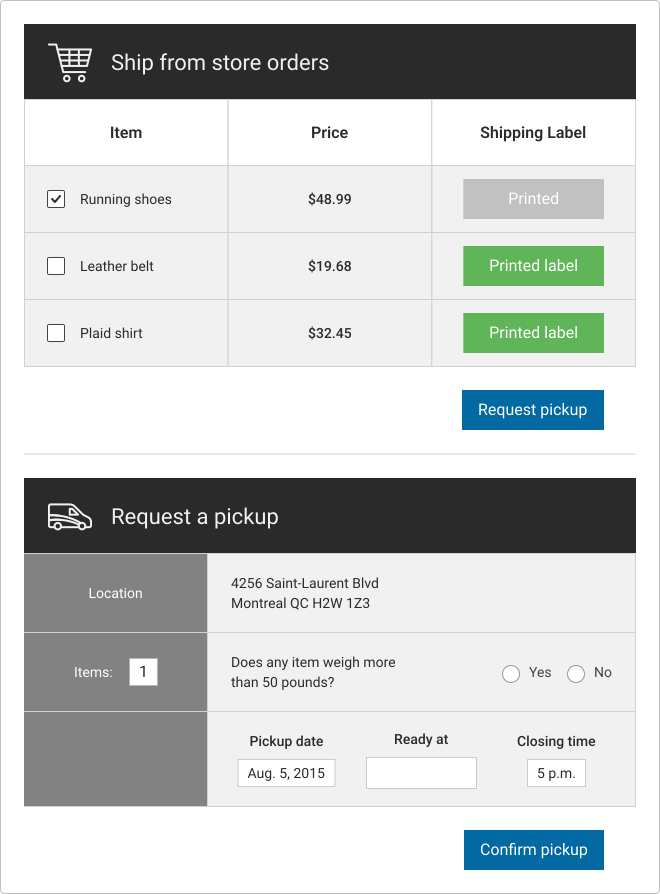
Example admin panel flow
Your admin interface should be designed so that store staff only need to enter the dynamic data required for the specific pickup:
- Staff enters date/time window and number of parcels.
- System injects store address, contact Info, and the correct header.
- The system then makes the Create Pickup Request API call.
This design minimizes keystrokes, reduces errors, and keeps your billing and tracking data clean.
The illustrations below show a different sample admin panel interface. As you can see, most fields are pre-populated for the convenience of store staff.
Testing and troubleshooting
Developers must decide when to expose an error message directly to the end-user versus implementing a mitigation strategy to prevent the error.
Common errors and how to fix them
Before troubleshooting, review our list of common errors and their codes. Each entry includes the specific HTTP status code and the recommended mitigation action.
Example: A 9112 error ("Service not available") may indicate a configuration problem. The mitigation is to check the available services for the selected origin or destination.
API error response structure
API error responses typically return a 400 Bad Request (for input validation errors) or a 500 Internal Server Error (for unexpected issues). The response body will contain a structured error object with the following key fields:
- code: The specific alphanumeric error code (for example, 9111).
- message: A plain text description of the error.
Developer support
If you've implemented the recommended mitigation strategies and are still experiencing issues, please contact our developer support team.