

Printing labels
Requirements for printing thermal and PDF shipping labels
ZPL II thermal labels – truncation requirement
If you’re printing thermal shipping labels in ZPL II format, your printer must have the ability to truncate text. Without this ability, you risk printing over top of important information on Canada Post shipping labels. Check your printer to make sure it can truncate text. Citizen printers, for example, as well as Zebra printers with older firmware, don't support truncation.
Test your printer
You can test your printer using the following sample code. Copy and paste the code into the utility provided by your printer manufacturer, then print this to a thermal label.
^XA
^CI13
^MMT
^PW812
^LL1218
^LS0
^FO63,63
^A0N,25,20
^FDThe text below should not spill out of the box^FS
^FO127,127^A0N,25,20^TBN,190,25^FDthistextshouldnotspilloutofthebox^FS
^FO121,121^GB197,32,1^FS
^PQ1,0,1,Y
^XZ
Printer results
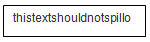
The printout will appear in a box.
If your printer supports truncation, the text will be truncated and contained within the box, as follows:
If your printer doesn't support truncation, the text will spill outside the box, as follows:
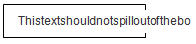
If your printer doesn't support truncation, we recommend you use PDF format to print your labels.
If you choose ZPL, the response from a Get Artifact call will include a file containing ZPL II printer commands. You will then need to either code a solution or use an application to stream the commands directly to a thermal printer.
ZPL is only available on thermal paper so <output-format> must be 4x6.