

Authentication guide
Ensure the integrity of our APIs and protect your data from unauthorized use
Our authentication guide helps you use our APIs in the most secure way possible. Understand how authentication and authorization protocols protect the integrity of the APIs and avoid data breaches and other forms of misuse.
Key concepts to understanding security in the Developer Portal
API authentication
All API operations require an OAuth 2.0 Bearer access token. Under the OAuth 2.0 protocol, you receive an access token when you provide a valid client_id and client_secret to an authorization service along with grant type client_credentials and any optional scope. The access token is then passed in the authorization header for each request.
Client credentials and the OAuth2 client credentials flow
Client credentials are based on OAuth 2.0 grant type. The client passes the access token in all resource calls as an HTTP header. The resource validates the token by calling the OAuth provider introspection service and if the token is valid, the resource provider processes the request.
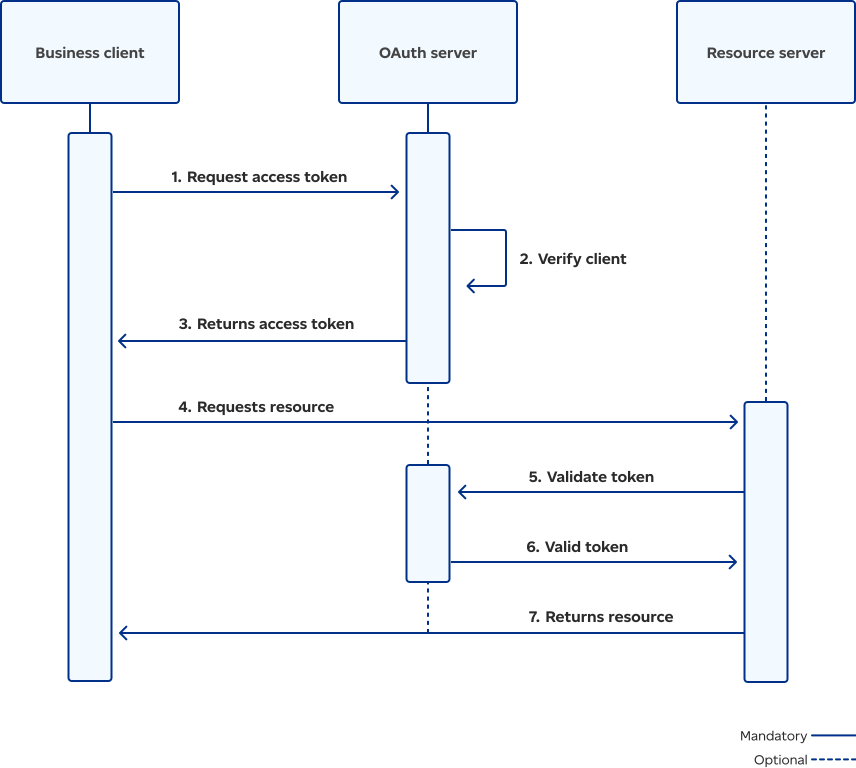
This flowchart outlines the process of authorizing a client application so it can access a protected resource. The process begins with the Business client requesting an access token from the OAuth server. The OAuth server verifies the client credentials and issues an access token to the Business client. This token is then used to request the resource from the Resource server. The Resource server validates the access token through the OAuth server before granting access and providing the requested resource to the Business client.
Apps
Canada Post uses apps to manage credentials and API access and to provide access to usage dashboards. An app can have one or more associated credentials. We support machine-to-machine grant type client_credentials.
Access tokens
To get an access token, call https://{$server}/oauth2/token service and provide your valid client_id and client_secret along with grant type client_credentials and scope.
The service returns a token with the following two attributes: consented_on and expires_in.
For example:
- consented_on: 1698647167
Represents the Unix epoch time when token lifetime started. - expires_in: 28800
Represents the number of seconds before the token expires.
By knowing both the consented_on and expires_in values, you can estimate the token expiry time.
Please note: If you don't request a new token before it expires, the token invalidates and returns a 401 Unauthorized code. When the token is returned, include it as Authorization: Bearer header along with other transaction‑specific data in the business service call.
How to consume services protected by OAuth2 security
Call token service to get token:
curl -- request POST
-- URL https://<APIGateway>/oauth2/token
-header 'X-IBM-Client-Id: 368b7f95d5574d85f83bcc04421628de'
--header 'X-IBM-Client-Secret: 3cb4a38f6598652c726c06a2db513b6d'
--header 'accept: application/json'
--data 'scope=merchant&grant_type=client_credentials'
It returns:
{

"token_type": "Bearer",

"access_token": "AAIgMzY4YjdmOTVkNTU3NGQ4NWY4M2JjYzA0NDIxNjI4ZGWk-WzMsbRQYLoT4LAo2h07lNzGUj0SsGlPckaIC9GeiDwa943kykQCOx0wZ5X3hUVmCfGN52IlXNaxpUrPxRFZ7iNVI5SV6FDlO1UjBIqjZ6b8UlSZ_1UVCQpxqGuwn48",

"scope": "merchant",

"expires_in": 3600,

"consented_on": 1698647250

}